
December 18, 2022.
The FIFA World Cup Final in Qatar. Thirty-six minutes into the game.
One of the most iconic moments in World Cup history.
Angel Di Maria scored Argentina’s second goal in a perfect example of timing, teamwork, and tactical brilliance. In just a few passes, Argentina went from defending to winning. Every player knew their role, executing just in time, and the result was a fantastic win.
ITSM is an entirely different playing field, but there’s a lot that ITSM teams can learn from World Cup football.
Achieving fast time to resolution for IT incidents is a lot like scoring a goal. When workflows are smooth and the IT team is aligned, then an IT incident can be guided to the net before it escalates into a major problem.
It all depends on how the help desk is set up and managed, and which tools you choose to support your play. With an ITSM platform like IT Care Center, as soon as an incident occurs, the right processes and people are on the ball automatically – and you are far more likely to score the goal.
As millions turn their attention to the FIFA World Cup, let’s take a look at the top ITCC features and tactics that can turn IT teams into winners in 2026.
Visibility: Make Kanban Your IT Tactical Board
A football coach never watches just one player. They scan the entire field, constantly adjusting tactics as the game unfolds in real time.
IT leaders need that same level of awareness. To deliver effective service, they must see the entire “playing field”– every ticket, every interaction, and every shift in demand – as it happens.
The Global IT Experience Benchmark Report, which analyzed 1.5 million incidents, revealed a surprising insight: users value fast initial response more than fast resolution. This means IT teams must balance the speed of engagement with the quality of resolution – a decision only possible with full operational visibility.
This is where a Kanban board becomes your tactical command center.
The IT Care Center features a Kanban board view that displays all IT tickets on a single centralized screen.
Like a coach using a tactical board to track player movement and adjust strategy, IT teams can use the Kanban view to see every ticket, their progress and status, across the organization in real time – from new alerts to ongoing incidents, escalations, resolutions, and post-resolution. Instead of focusing on isolated issues, the Kanban board gives teams a complete, dynamic picture of the entire IT game.
Every Metric Counts: Custom SQL Ticket Indicators
In modern football, the difference between good teams and elite teams is analytics.
Once, players were driven by skill, instinct, and experience. Today, they leverage real-time, evidence-based insights for everything from passing patterns to positioning. Football even has its own “KPIs”: xG (expected goals), xA (expected assists), and xT (expected threats). Coaches and analysts track every movement on the field and translate the granular data into decisions that impact performance.
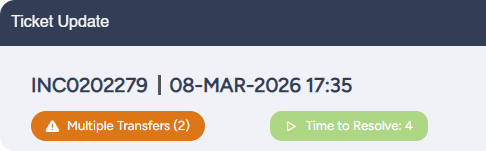
This same principle applies to ITSM. Just as a football manager needs instant access to match data, IT teams need real-time visibility into what is happening inside their ticketing environment. Without clear, accessible metrics, IT agents are reactive instead of proactive, leaning on assumptions rather than facts. With ITCC’s new Custom SQL Ticket Indicators feature, IT administrators can now define the data to be displayed at the top of the ticket screen. For example, the number of group transfers, SLA time, or any other custom business metric is positioned directly at the top of the ticket, so agents can access the most important KPIs at a glance. Custom SQL Ticket Indicators transform the ticket view from a static record into a dynamic decision-making tool, just what IT teams need to work quickly and effectively.
Success Starts from the Top Level: Cascading LOVs
Scouting for World Cup players is a massive, complex operation. Coaches evaluate thousands of individuals and apply successive filters based on roles, formations, and playing style. A decision at the top level immediately reshapes the pool of viable players. Only those who meet the tactical and physical requirements remain under consideration.
This approach helps to minimize inaccuracies and accelerate decision-making. Ideally, the final chosen team is completely aligned, and incompatible players have already been filtered out of the process long before they could introduce a risk into the recruitment process.
IT agents face a similar challenge. Incorrect or irrelevant inputs can disrupt IT workflows, leading to bigger problems down the road. Misrouted tickets, service delays, and inefficiencies can all happen when forms are open and unguided.
ITCC’s Dynamic Cascading Fields address this challenge by introducing logic-driven dependencies within form attributes. Administrators can define parent-child relationships between List of Values (LOV) fields, ensuring that each selection dynamically filters the available options in subsequent fields. For example, selecting a specific business service or incident type immediately narrows the next set of choices to only those that are contextually valid.
The result is faster form completion, improved data accuracy, and fewer errors from the start. ITCC’s Dynamic Cascading Fields ensure every input aligns with the intended workflow, helping IT teams operate more efficiently and confidently.
More Than a Logo: Why Branding Wins the Experience
The FIFA World Cup is a powerhouse of branding and one of the most famous and valuable global brands. World Cup sponsorship and advertising in 2026 is expected to be worth more than $10 billion.

While the average IT organization doesn’t need to do branding World-Cup-style, it’s still important to remember the “3-7-27” rule. According to brand experts, it takes around 3 brand exposures to notice it, 7 exposures to remember it, and 27 exposures to trust it.
IT teams may be overwhelmed with the technical side of the job and have little time to consider branding. They may also assume that branding is just a cosmetic adjustment. But it is so much more than that. Consistent, unified branding across user touchpoints is what builds recognition, credibility, and trust. Branding inside IT systems helps create seamless and connected interactions, which makes your brand experience memorable. ITCC understands the importance of branding for IT, so it offers built-in branding capabilities across the user experience. Newly added features include customizable chatbot design, so organizations can tailor their IT service chatbots to match their brand identity.
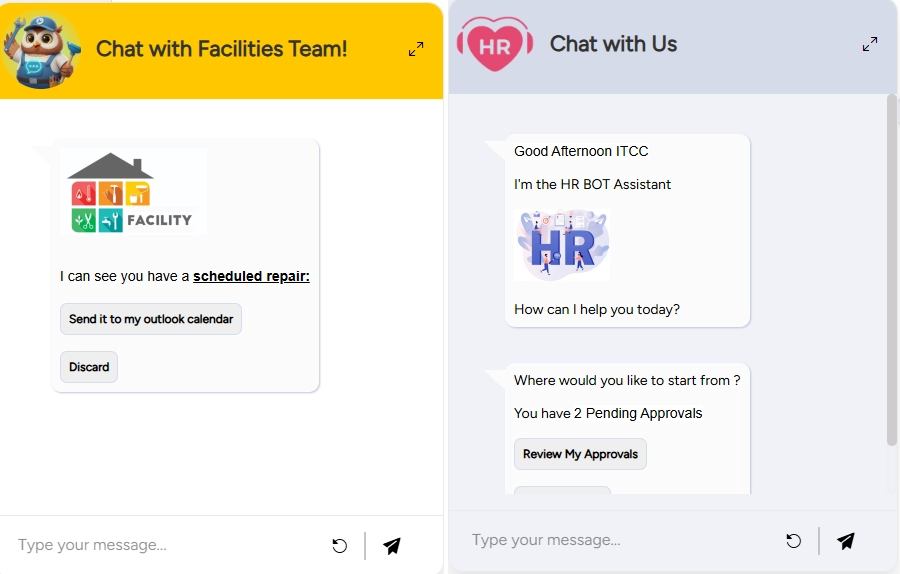
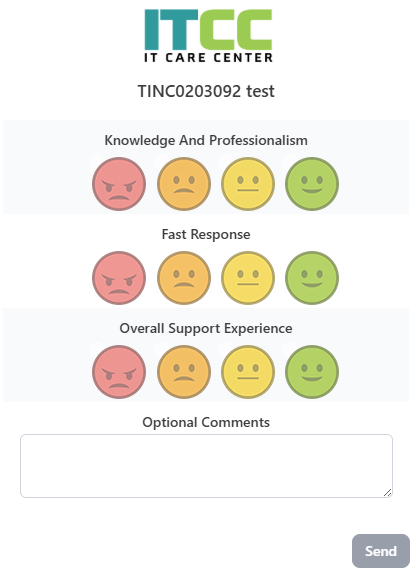
ITCC also now supports branded customer surveys, allowing companies to embed their logo directly into feedback processes and maintain a unified look and feel.
Play to Win with ITCC
If you’re looking to up your game and win at ITSM, IT Care Center offers a wide range of tools and features to help.
Unlike football, the biggest opponent in ITSM is not another team. It’s you! ITCC can give your IT team tactical awareness, data visibility, and operational flexibility to beat your KPIs and improve your play, every day.