Imagine for a moment an enterprise organization… say, the City of Seattle.
Seattle City Hall runs the largest municipality in Washington state, and has a significant IT infrastructure, comprising 21,500 workstations, 2,600 network devices, and 3,500 servers.
Each workstation presumably includes several hardware and peripheral items, such as screens, mouse pads, and cables.
Not to forget the multitude of installed software and applications.
Add it all up, and you’re looking at many tens of thousands of IT assets. All of which need to be continuously managed and controlled.
How? With a robust approach to IT Asset Management and an advanced IT Asset Management tool.
What is IT Asset Management and why is it important?
Businesses today face increasingly complex IT ecosystems with a growing number of endpoints and IT devices, both on-premise and cloud-based. Particularly in hybrid environments, it is simply no longer possible to track all those assets manually across different locations. Visibility is a common concern; 53% of IT teams say they don’t have the visibility they need for successful, scalable asset management.
ITAM solves this challenge by offering a unified, centralized approach for the management and control of all IT assets in an organization across time.
IT Asset Management is the process of tracking, managing and maintaining
an organization’s IT assets throughout their lifecycle.
Several types of IT assets are covered by ITAM, including hardware, software and applications, network infrastructure, cloud resources, and software licenses. Other IT assets may include mobile phones, Point-of-Sale (POS) systems, and Internet-of-Things (IoT) devices.
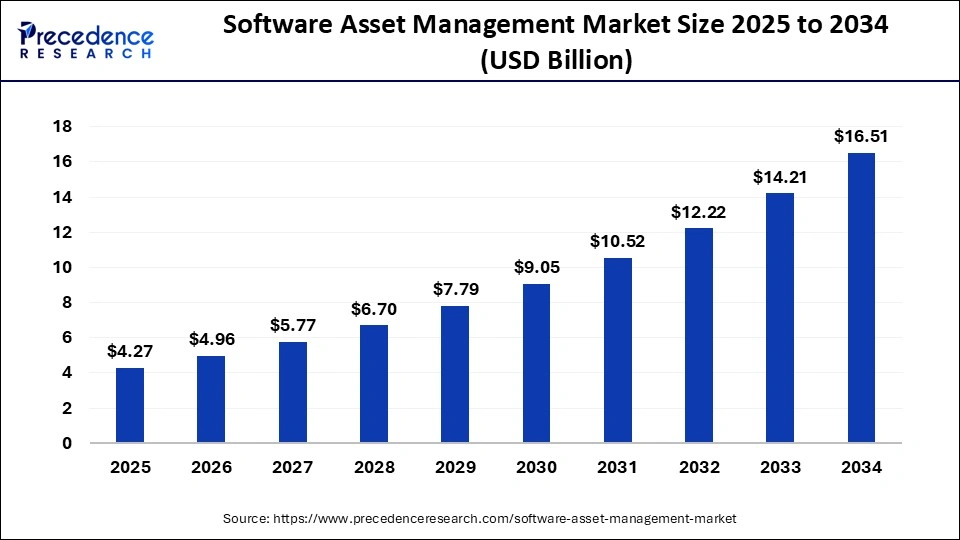
While hardware is currently the largest category in IT Asset Management, the software segment is expected to quadruple in the next decade, increasing from $4 billion market value in 2025 to $16 billion in 2034.
IT asset lifecycle: An overview
To understand the ITAM process, you’ll need to become familiar with the IT asset lifecycle:
| IT asset lifecycle stage | Description |
|---|---|
| Planning and procurement | The need for a particular IT device or software is identified. This phase covers the acquisition process, from researching potential products and vendors, through decision-making and purchasing. |
| Deployment | The IT asset is distributed, installed, and configured to the assigned location and/or user. |
| Operation and maintenance | The IT asset is monitored and managed during daily use, including updates, troubleshooting, license renewals, and ongoing maintenance, as well as tracking cost, performance, and ROI. |
| Disposal | In this final phase, the IT asset is replaced or retired. This involves decommissioning the item and ensuring it is disposed of appropriately and according to compliance regulations and company policy. |
With the help of an ITAM tool, it is possible to keep track of all IT assets in the organization across these lifecycle stages, and to know the precise status of each asset at any given moment or location.
The ITAM process: A brief walkthrough
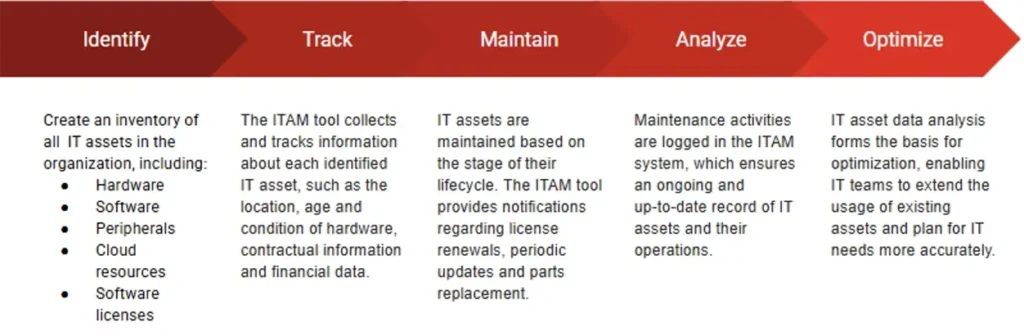
The first step in the ITAM process involves creating an inventory of all IT assets in the organization. Then, these identified assets can be continuously tracked and monitored.
The ITAM tool collects and tracks information about each asset, such as the location, age, and condition of hardware, contractual information (ie, licenses, SLAs, warranties), and financial data (ie, asset costs & budget source vs performance).
Finally, IT assets are maintained based on the stage of their lifecycle. The ITAM tool provides notifications regarding license renewals, periodic updates, and parts replacement. Maintenance activities are logged in the ITAM system, which ensures an ongoing and up-to-date record of IT assets and their operations. This data can also be used to analyze asset performance over time.
What are the benefits of IT Asset Management?
IT impacts every aspect of an organization, from accounting to administration, finance to facilities, marketing, and management.
Therefore, every part of the business is also impacted by IT asset management.
Good ITAM can boost IT security, improve operations, save costs – and much more.
Let’s take a look at some IT asset management benefits and why they occur.
You can’t control what you can’t see.
ITAM provides accurate and up-to-date visibility of the organization’s IT assets, and directly connects assets to specific users, departments, and owners. This helps reduce waste and avoid risks associated with unused or ‘missing’ assets.
One centralized source of IT asset information.
A typical mid-to-large-sized organization manages hundreds or thousands of IT assets – both tangible and intangible – each with its own history, status, and requirements. ITAM is a unified database that serves as the ‘truthteller’, providing one source of information for all IT assets across the organization. This enables a level of accuracy, efficiency, and control that would otherwise be impossible.
Get more mileage from your IT assets.
Robust ITAM provides accurate real-time data about the current state of IT assets, empowering IT managers to make informed decisions about asset usage and to maximize existing resources. It also helps optimize maintenance schedules and extend the life of assets, which improves their ROI.
Less downtime, more efficiency.
An accurate IT inventory gives visibility of how assets are used, enabling more efficient allocation of budget and accurate forecasting of IT needs. This minimizes downtime and streamlines IT processes, boosting efficiency in the long term.
Security, compliance, peace of mind.
An ITAM tool automatically monitors software installed in the organization and ensures that licenses are valid and in compliance with terms and conditions. This helps to prevent defaulting on licensing agreements and the expensive penalty fees that may be incurred.
According to Deloitte’s Global ITAM Survey 2025, less than a third of organizations include ITAM in their cybersecurity strategies; however, this is set to change. Integrating ITAM and security responses more deeply will be a future key to cyber-resilience and compliance.
How to choose enterprise asset management software?
Here are some quick pointers to get started with choosing the right IT asset management solution for you.
Conduct a needs analysis: Start by examining your IT inventory and identifying what types of assets require management and their approximate quantities. Create a list of the various software licenses, warranties, and regulatory compliances that must be met. Using this information, map out the current approach to procuring, tracking, maintaining, and retiring assets and pinpoint any gaps and weak spots.
Identify the required features and functionality: Once you’ve gained an understanding of your ITAM needs, you can begin researching available tools. IT Care Center’s IT Asset Management module, for example, can be deployed on-premises or in the cloud, making it suitable for all types of IT infrastructures. It also features customizable analytics dashboards, which is critical for tracking asset management KPIs. Conduct a comparative analysis of the various products on the market that meet your requirements and narrow them down to a shortlist of those that offer the features while remaining within the estimated budget.
Go low code: It’s no secret that there is a skills gap in the IT industry, and many organizations struggle to retain high-quality IT teams. A low-code IT asset management system, such as IT Care Center, shortens the learning curve and enables IT staff to work more efficiently. Empower IT teams to build and optimize ITAM workflows quickly and easily by choosing a platform that requires little to no coding.
Customer-centric approach: The best ITAM solution is one that puts the customer – your organization – first. Research your shortlisted vendors for their customer support ratings, and take a look at reviews and testimonials. Be sure to closely examine the vendors’ SLAs and their stated commitment to customer support. IT Care Center, for instance, offers timely and effective support to maximize the business functionality of its customers, 24/7/365.
Request a demo: Any reputable company will offer a free demo or trial. This provides a crucial opportunity for you to examine the product and test it out in your IT environment before committing. Take full advantage of these pre-sale offers to ensure you make the right choice.
What are some tips for managing IT assets in a company?
Whether you’re implementing ITAM for the first time or refining your existing practice, a few focused steps can make a big difference. Here are five practical tips to help you build a stronger ITAM foundation and manage your assets more effectively.
Tip #1: Think of ITAM as a lifecycle
IT asset management is not just a ‘catalog’ of assets. Effective ITAM is based on the asset lifecycle. Set up your asset tracking according to a pre-defined lifecycle-based workflow, for example:
- Request
- Approval
- Procurement
- Deployment
- Operation
- Support/maintenance
- Retirement
- Disposal
This approach transforms ITAM from simple inventory tracking to more effective, holistic lifecycle governance.
Tip #2: Maintain data hygiene
IT asset management will only be as good as the data it is based on. It is critical to keep your asset inventory clean and consistent.
Create a routine to maintain accuracy and ensure your ITAM data is up to date:
- Verify assigned owners regularly
- Investigate and/or remove unused assets
- Use standardized naming rules for various assets (i.e., devices, peripherals, software, cloud resources)
- Ensure that every asset is assigned a lifecycle status
Tip #3: Set compliance guidelines at the outset
Manage compliance from the beginning, before a device or software is deployed. There are several ways to do this, for example, by auto-blocking the installation of non-approved software or setting up a workflow for checking license validation before assigning software to a user.
After all, it is much easier to control compliance before an asset is assigned and in use than to chase it up after.
Tip #4: Integrate with other IT practices
Nearly half of organizations say their approach to IT asset management is reactive, rather than proactive. A key way to become more intentional with ITAM is to make it part of a broader cross-organizational IT management doctrine.
IT Care Center is all-inclusive, offering the full suite of ITSM modules – including ITAM – in a single-license solution. ITCC enables organizations to integrate all ITSM functions across business departments, from incident management and problem management to service catalog, knowledge management, and IT asset management, in one comprehensive, affordable tool. (Plus, the number of end users is unrestricted, supporting scale and provisioning as needed, at no extra cost.)
Tip #5: Consider cloud resources as top priority assets
Modern ITAM cannot afford to overlook cloud resources. Unlike physical IT assets, cloud assets are harder to track. Moreover, cloud and software subscription services account for a higher proportion of recurring spend, so their financial impact is significant.
Advanced ITAM teams leverage several methods to prevent cloud sprawl and optimize spend, such as:
- Identifying and tracking all cloud databases, instances, storage, and service accounts as assets
- Standardizing SaaS users, licenses, and costs to create a clear map of cloud assets
- Monitoring unused SaaS seats and orphaned cloud resources
- Using tags and policies to enforce ownership, attribute costs, and optimize lifecycle decisions
- Integrating FinOps KPIs into ITAM dashboards to track costs and reduce waste
Goodbye to manual spreadsheets, Hello to efficiency and savings
According to the ITAM Forum report, approximately a third of software in an organization is underused or wasted. ITAM offers a clear pathway to increasing efficiency, reducing waste, and maximizing IT assets and resources.
Thanks to the advent of advanced, intuitive ITAM tools, such as IT Care Center, you no longer have to contend with complicated spreadsheets and manual tracking. Now, you can rely on a centralized IT Asset Management platform that automates critical tasks, such as license renewals, and saves you time, manpower, and budget.
Looking for an IT Asset Management tool that supports the full lifecycle, cloud resources, and enterprise scale?